

When the GUI editor is enabled there won’t be a ‘Insert image’ button below the post, you can use the image icon. This one:
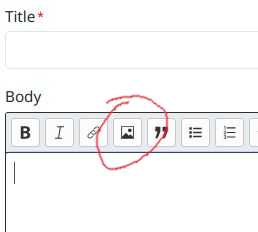
Also, you can paste an image from your clipboard into the body field and it’ll be automatically uploaded and the markdown for the image inserted into the field.
You can manage your files at https://piefed.social/user/files
It’s quite basic at the moment but I’d like there to be a search, some way to put keywords on files, a file resizer to save space. Eventually.
Excellent! And I take it that you just recently added a 50mb total cap per user content?
Yes. It’s a pretty low cap, once I have a bit of data on how much people use this I’ll be able to estimate the cost to provide it and probably increase it.